Skip to content

Made for children in Years 5 and 6

11+ practice that feels like a game.

Short daily quests in Maths, English, Verbal and Non‑Verbal Reasoning, a 42-week plan that shows what to do next, and an AI study helper on hand every day, not just once a week, to explain the why and the how.

The free plan needs no card. Upgrade whenever you are ready. Not sure yet? Try 8 sample questions.

How it works

A clear plan, one small step at a time

Your child always knows what to do next, and you always know how they are getting on.

  1. 1

    Create your parent account

    Sign up free in a minute, then add your child with just a first name or a nickname.

  2. 2

    Play a short quest each day

    Four short quests a week and a boss paper at the weekend, with points, levels and prizes you choose to keep them going.

  3. 3

    Watch the progress

    See scores by subject and topic, what needs more practice, and whether your child is on track for the exam date.

All four 11+ subjects, each with its own colour

  • Maths
  • Verbal Reasoning
  • English
  • Non-Verbal Reasoning

Meet the Oracle

Help on hand every day, not just one lesson a week

When a question does not make sense, or your child cannot see why an answer is right, there is usually nobody to ask until the next lesson, or until you can sit down with them. The Oracle is an AI study helper built into the game, ready the moment they get stuck, on a school night or at the weekend.

  • Hints first. It gives hints and guiding questions first, then explains the answer in full once your child has had a go.
  • The why, not just the answer. Every explanation shows how to get there, so your child has the tools to tackle the next one.
  • No need to sit beside them. Your child can get unstuck on their own, so daily practice does not depend on your time, or on remembering the method yourself.
  • Safe by design. There is no typing. Your child presses buttons such as "Give me an example" or "Why is that the answer?", so no personal details can be shared.

See inside

A look at the app

Real screens from 11+ Quest. The names and progress are examples. Click any screen to enlarge it.

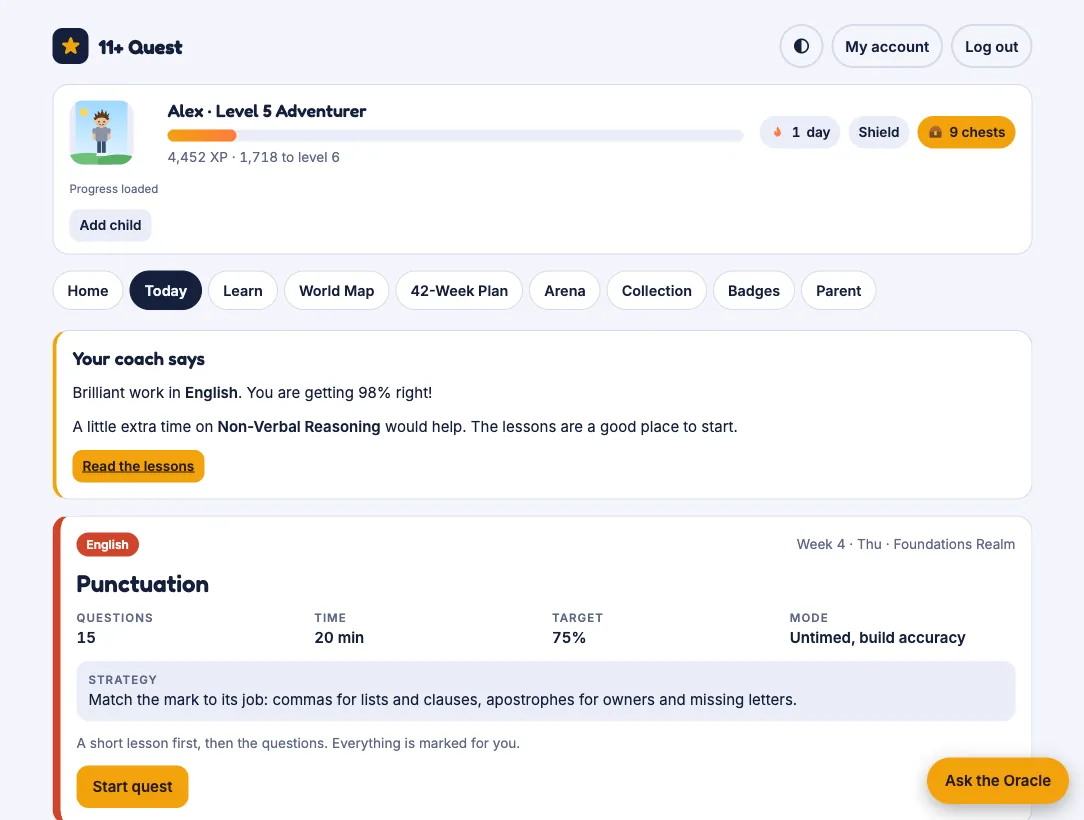
  • The Today screen. A coach note says the child is doing well in English and a little extra time on Non-Verbal Reasoning would help, above today's Punctuation quest with a Start quest button.
    Today A short quest each day, with a friendly note on what is going well and what to practise next.
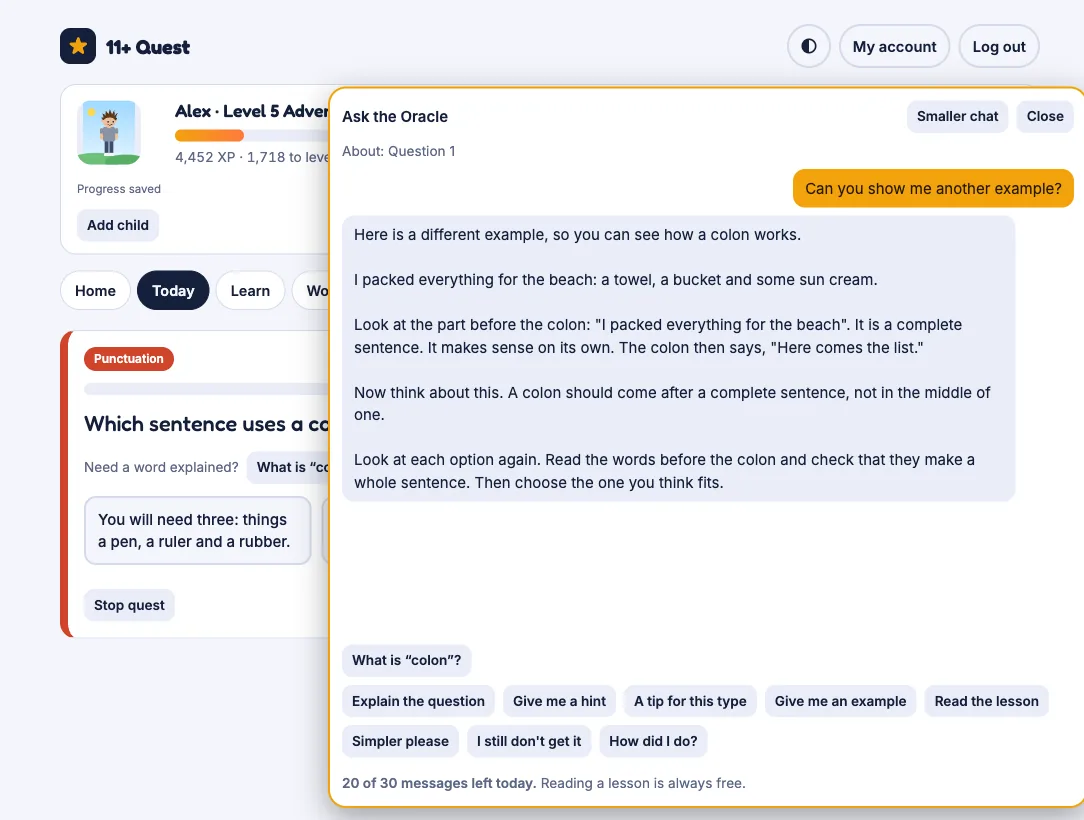
  • A Punctuation question about colons with the Oracle chat open. It shows a worked example about packing for the beach, then tells the child to look at each option again and choose, with buttons for a hint, a tip, a simpler explanation and more.
    The Oracle Stuck? One button gives a worked example of something similar, and leaves the answer for your child to find.
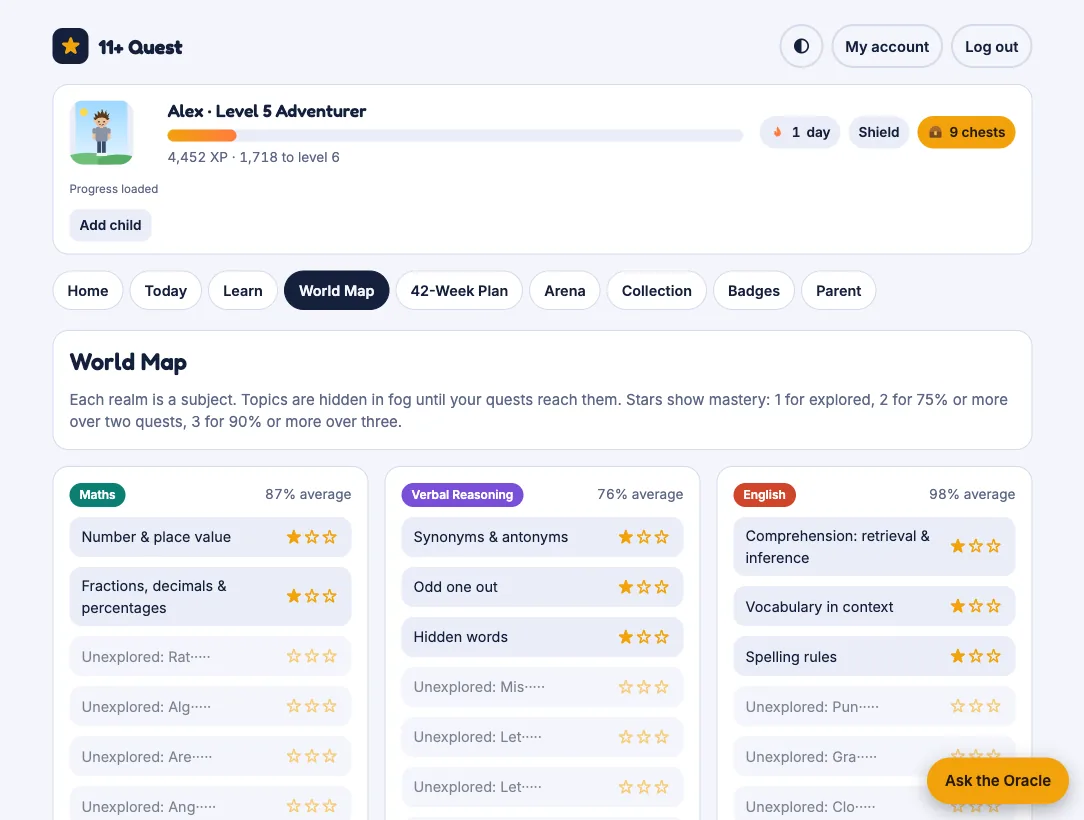
  • The World Map screen, with a column for each subject. Topics practised so far have stars and the rest are hidden in fog.
    World Map Every topic is a place to explore, and stars are earned as your child gets better.
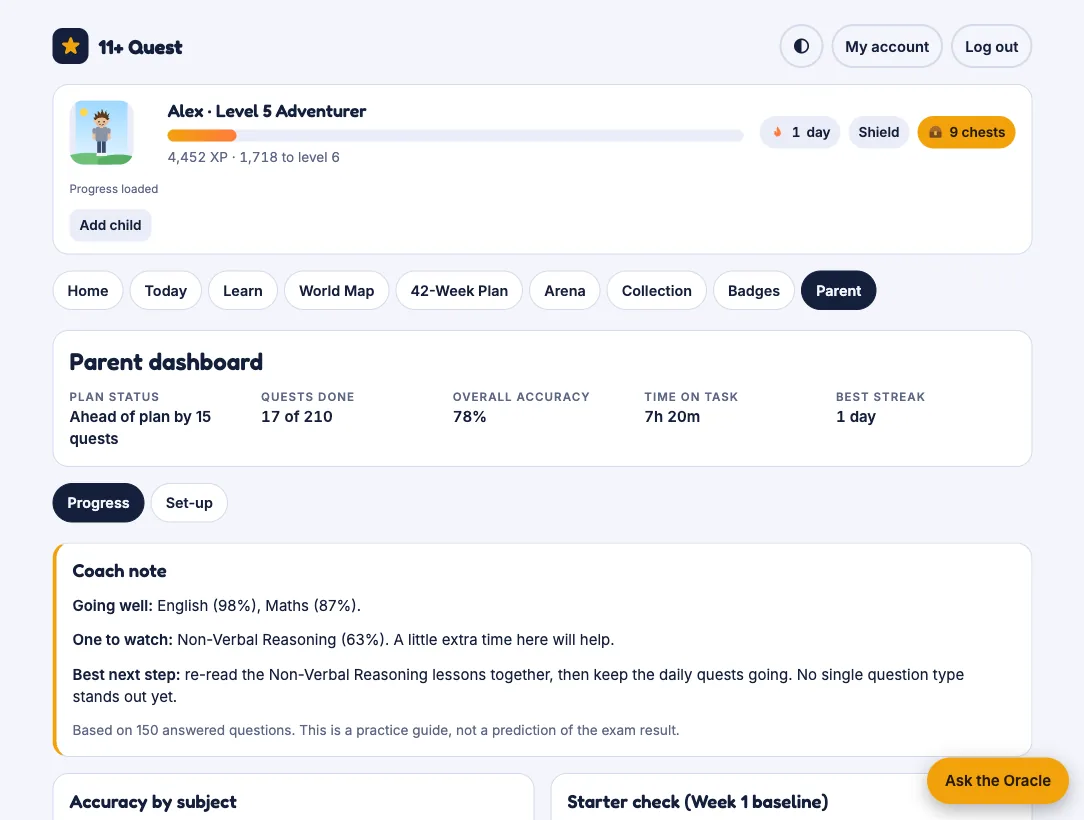
  • The Parent dashboard. It shows plan status, quests done, overall accuracy and time on task, with a coach note on what is going well and one thing to watch.
    Parent view Scores by subject and a plain-language note, so you can see how your child is getting on.

Not ready to sign up? Try 8 real questions first.

One or two from each part of the plan, marked instantly, with the Oracle's help beside each. No account, and nothing is saved.

Try the questions

Plans

Start free. Upgrade when you are ready.

Try the first week with no card. Choose Explorer for the whole plan.

Scout

Try the game and the Oracle with no card needed.

Free forever

  • Week 1 of the 42-week plan: a starter check across all four subjects
  • The exam-skills lesson
  • 1 child profile, with progress saved to your account
  • 10 free messages with the Oracle study helper

From the founder

Why I built it

  • Learning on your own is hard, and my son needs to know he's on the right track. I wanted him to have support the moment he needs it, so he is never stuck on a question not knowing how to work it out. The Oracle gives him hints, shows him why an answer works, and every answer is marked straight away. For us, it has taken the place of a tutor.

    The parent who built 11+ Quest

    Read the story

Questions

Things parents ask

Who is it for?

It is made for children preparing for the 11+, usually in Year 5 or Year 6. The plan runs for 42 weeks, and the questions are pitched at that level.

How many questions are there?

The 42-week plan has 210 quests: four short quests a week and a boss paper every weekend. That adds up to over 5,000 practice questions across 90 question types in Maths, English, Verbal Reasoning and Non-Verbal Reasoning. Many questions are built with fresh numbers each time, and some come from hand-written sets, so a familiar question can come round again, which is normal for practice. The free plan includes the 120-question Week 1 starter check. Explorer adds the Practice Arena, which makes new quick rounds on every topic whenever your child wants more.

Is this the official GL Assessment?

No. 11+ Quest is an independent practice service. All of its questions are original and written in the style of 11+ papers. It is not connected to GL Assessment, Quest Assessments, any exam board, school or local authority, and it cannot promise any exam result.

Does it work on a tablet or a phone?

Yes. It runs in the browser, so there is nothing to install, and the screen adapts to the size of the device.

Is the Oracle a real tutor?

No, the Oracle is an AI study helper, not a person, and 11+ Quest does not offer live one-to-one lessons. What it gives is help at the moment your child needs it: hints, examples and an explanation of the why and the how, every time they play, so they are never stuck on their own.

How is this different from a tutor?

A tutor gives your child personal attention for an hour or so a week. 11+ Quest is there on every other day: a short quest every day, with every answer marked straight away and help on hand the moment they get stuck. Because it records every answer, it also shows where your child is strong and where they need more time, which you can see in the Parent tab. Some families use it instead of a tutor, and others alongside one. It is an independent practice service and cannot promise any exam result.

What does the Oracle do with my child's information?

Your child never types to it. It sees only the question on screen and the button they pressed, never their name. When they ask "How did I do?", it sees their scores, not who they are. Messages are not stored.

How does it know what my child needs help with?

As your child plays, 11+ Quest records their results by subject and topic. It uses simple rules, not guesswork: when a topic has had enough answers and the score is low, it shows up as something to practise and your child gets a friendly note about it. The topics they are doing well in are shown too. It is a guide to where to spend practice time, not a prediction of any exam result.

How many children can I add?

The free plan has one child profile. Explorer has up to three, each with their own progress.

Can my child play without my login?

Yes. In the Parent tab you can make a play link for each child. Opening it on their tablet or computer signs that device in to just their own quests, with no password for them, and no way into your account, the Parent tab or your other children. It uses your plan, and you can replace it or turn it off whenever you like.

Can I cancel?

Yes, from your account page at any time. Everything your child has already earned stays saved, and you return to the free plan.

Ready to give it a try?

Create a free account and let your child play the week 1 starter check today.